
Re-Fit Camera: Next-Gen Ranger
Note: These instructions are to re-mount the "Tub" reverseing camera. Not for the Cab Chassis camera
Note: These instructions are to re-mount the "Tub" reverseing camera. Not for the Cab Chassis camera
1
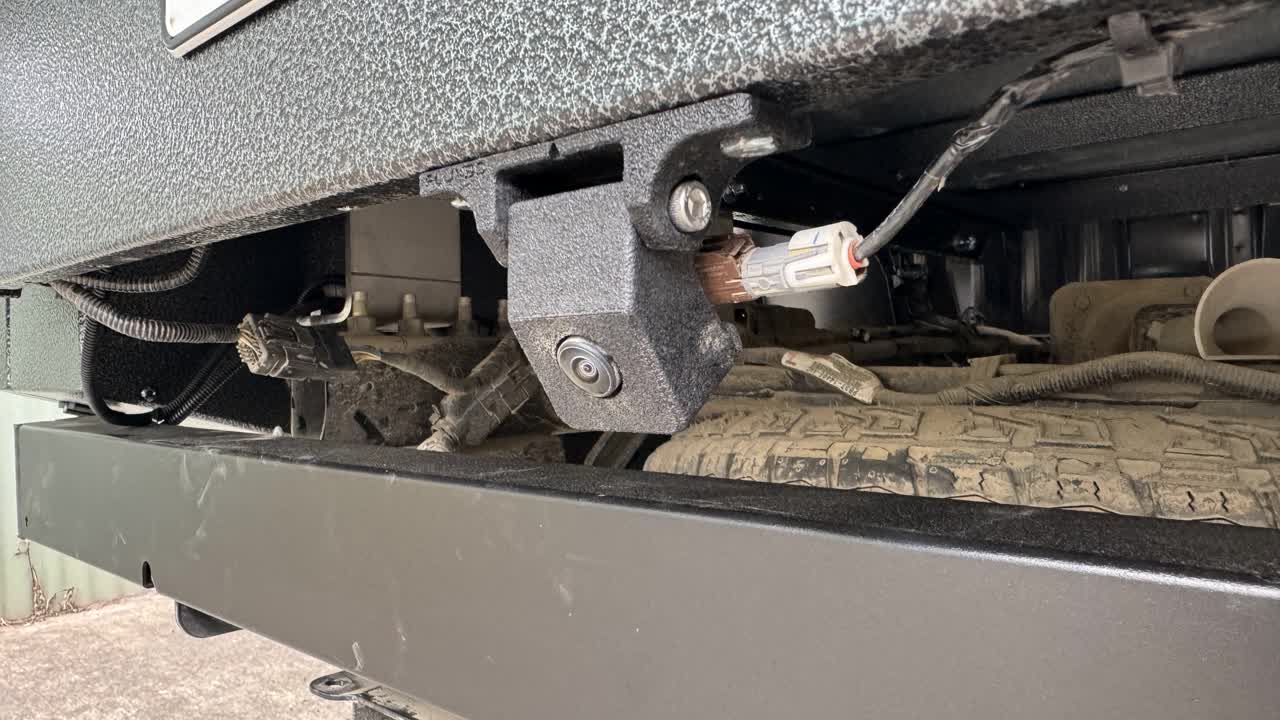
Step 1 of 8It will look like this when fitted
2
Step 2 of 8
Tools Required
- Socket: 10mm
- Spanner: 10mm
- 4mm Hex Head
3
Step 3 of 8
Check that you have been supplied the Correct camera bracket . It should be CB005
4
Step 4 of 8Fit camera to the 3-D printed bracket
5
Step 5 of 8Fit camera to vehicle. It will either be mounted like this (which is to the bottom side of the license plate panel.) Or it will be mounted to the bottom of the trundle drawer
6
Step 6 of 8Tighten, 10mm
7
Step 7 of 8Test camera. Make sure it works when the vehicle is put in reverse, adjust the angle of the bracket if required.
8
Step 8 of 8Adjust the angle of the bracket is required M4 hex head