
Knowby
Resetting Course Synchronisation Errors - Line 9 Filler
Instructions to reset servo alarms: Course Synchronisation required
1
Step 1 of 4
<h2>Servo Failure Faults</h2><p>The machine may stop with Sychronisation error due to a blockage or servo has been put out of position through maintenance or cleaning works.</p><ol><li><p>Log into machine (needs to be Technical supervisor or higher)</p></li><li><p>Navigate to Servo page on main screen</p></li></ol><blockquote><p>NOTE;  If fault is 'Servo Failure' see:</p><p>​<klink id="b3c4b176-5e71-4a1f-bb0f-fbf8fd365139" step-id="16ec1ad7-4e54-40bb-b993-653f2b1a1c4e">Resetting Servo Failure - Line 9 Filler</klink>​</p></blockquote><p></p>

Servo Failure Faults

The machine may stop with Sychronisation error due to a blockage or servo has been put out of position through maintenance or cleaning works.

  1. Log into machine (needs to be Technical supervisor or higher)

  2. Navigate to Servo page on main screen

NOTE; If fault is 'Servo Failure' see:

Resetting Servo Failure - Line 9 Filler

2
Step 2 of 4
<p>Navigate to '<strong>SERVO COURSE SYNCHRONISATION</strong>' page</p>

Navigate to 'SERVO COURSE SYNCHRONISATION' page
3
Step 3 of 4
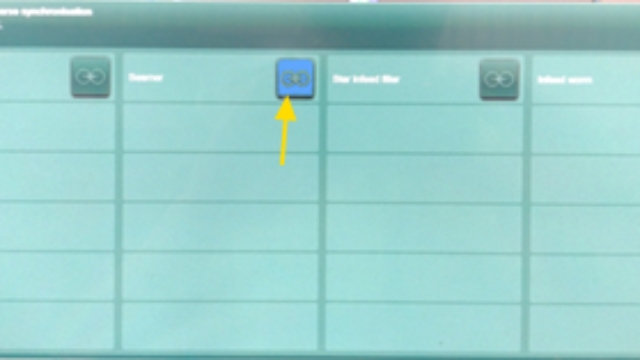
<p>Drive in fault will be flashing Blue</p><ol><li><p>Open doors and check for any obstructions or abnormal behavior that may have caused the fault (ie: jammed cans)</p></li><li><p>Once fault has been identified and fixed, press on the blue flashing fault to reset</p></li></ol><p></p>

Drive in fault will be flashing Blue

  1. Open doors and check for any obstructions or abnormal behavior that may have caused the fault (ie: jammed cans)

  2. Once fault has been identified and fixed, press on the blue flashing fault to reset

4
Step 4 of 4
<ol><li><p>Close all doors and reset machine with <strong><em>Fault Acknowledge</em></strong> button</p></li><li><p>Restart filler, it will re-synchronise once started</p></li><li><p>Watch for any abnormalities in function and restart production</p></li><li><p>If fault persists on a certain motor further investigation is required</p></li></ol><p><a target="_blank" rel="noopener noreferrer nofollow" href="https://intranet/index.php?option=com_phocadownload&amp;view=category&amp;download=21875:abc-peg-003-resetting-servo-faults-l9-filler&amp;id=2591:engineering&amp;Itemid=220">Associated PPM - ABC-PEG-003</a></p><p></p>
  1. Close all doors and reset machine with Fault Acknowledge button

  2. Restart filler, it will re-synchronise once started

  3. Watch for any abnormalities in function and restart production

  4. If fault persists on a certain motor further investigation is required

Associated PPM - ABC-PEG-003