
Knowby
Re-Fit Camera: "RG" DMax-BT50 with Tub
1
Step 1 of 18

Suits latest "RG" model DMax and BT50 with Tub

2
Step 2 of 18

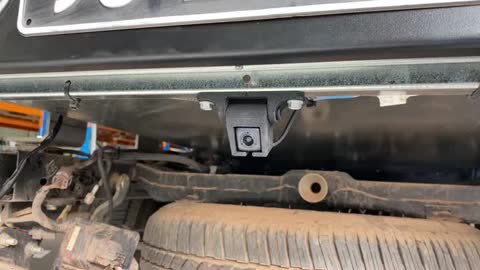
Looks like this when fitted

3
Step 3 of 18
<p>Identify supplied Bracket</p>
<p>Marked with &quot;CB003&quot;</p>

Identify supplied Bracket

Marked with "CB003"

4
Step 4 of 18
<p>Identify the camera (which would have been removed from the Tub)</p>

Identify the camera (which would have been removed from the Tub)

5
Step 5 of 18
<p>Use a fine Phillips screwdriver to remove all 4 screws on back of camera</p>

Use a fine Phillips screwdriver to remove all 4 screws on back of camera

6
Step 6 of 18
<p>Unplug the lead for back of camera</p>

Unplug the lead for back of camera

7
Step 7 of 18
<p>Remove the steel mounting bracket, (highlighted green). Discard it, it is not required.</p>

Remove the steel mounting bracket, (highlighted green). Discard it, it is not required.

8
Step 8 of 18
<p>Plug in and re-tighten with original screws</p>

Plug in and re-tighten with original screws

9
Step 9 of 18

Fit camera to bracket. The printed text (on top of camera) goes to top.

10
Step 10 of 18
<p>Use original screws to tighten camera to bracket.</p>

Use original screws to tighten camera to bracket.

11
Step 11 of 18
<p>Fit to Camera to Tray.</p>

Fit to Camera to Tray.

12
Step 12 of 18
<p>Tighten using 10mm</p>

Tighten using 10mm

13
Step 13 of 18
<p>Connect camera harness. (This would have been removed from tailgate when removed from Tub)</p>

Connect camera harness. (This would have been removed from tailgate when removed from Tub)

14
Step 14 of 18
<p>Zip ties harness neatly</p>

Zip ties harness neatly

15
Step 15 of 18

Adjust angle of camera so tipping slightly down.

16
Step 16 of 18
<p>Check camera works when in reverse. If angle isn't right, adjust it up/down.</p>

Check camera works when in reverse. If angle isn't right, adjust it up/down.

17
Step 17 of 18

Done

18
Step 18 of 18
<p>Y</p>

Y