Knowby Automotive Group Australia Pty L

Knowby
Rav4 Wiring Harness Instructions - RVHBC
1
Step 1 of 7
<p><strong>Step 1:</strong> Remove the passenger side kick panel indicated</p>

Step 1: Remove the passenger side kick panel indicated

2
Step 2 of 7
<p><strong>Step 2:&nbsp;</strong>Locate the CAN Bus piggyback (pictured)</p>

Step 2: Locate the CAN Bus piggyback (pictured)

3
Step 3 of 7
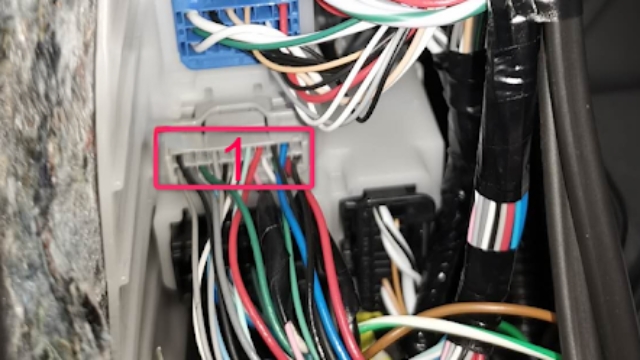
<p><strong>Step 3:</strong> Unplug wiring (1) and plug it into the CAN Bus&nbsp;piggyback wiring harness. Plug other end of piggyback harness back into location (1).</p>

Step 3: Unplug wiring (1) and plug it into the CAN Bus piggyback wiring harness. Plug other end of piggyback harness back into location (1).

4
Step 4 of 7
<p><strong>Step 4: </strong>Locate the crimp connector on the main harness (circled)</p>

Step 4: Locate the crimp connector on the main harness (circled)

5
Step 5 of 7
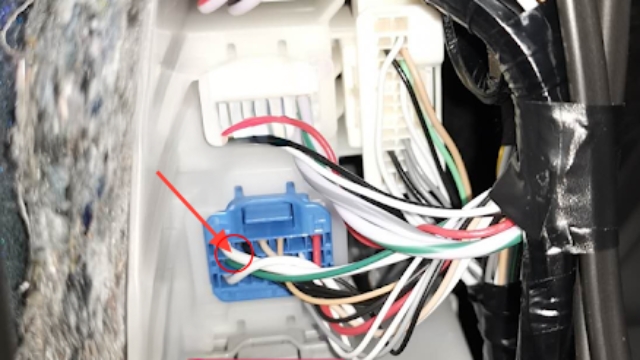
<p><strong>Step 5:</strong> Using the black and grey crimp connector, crimp it to the cable indicated in the photo</p>

Step 5: Using the black and grey crimp connector, crimp it to the cable indicated in the photo

6
Step 6 of 7
<p><strong>Step 6:</strong> Run the wiring harness along the firewall behind the dash from the location in <strong>step 1</strong> to the right hand side and attatch it to the push switch.</p>

Step 6: Run the wiring harness along the firewall behind the dash from the location in step 1 to the right hand side and attatch it to the push switch.

7
Step 7 of 7
<p><strong>Step 7:</strong> Locate the pink wire and attach to the light bar high beam feed</p><p></p><p>Replace kick panel once connected</p>

Step 7: Locate the pink wire and attach to the light bar high beam feed

Replace kick panel once connected