
Creating Supplier Invoices Xero

Creating Supplier InvoicesXero
Sculptform AU invoices
All the AU invoices - 1-1693 inventory,
If there is an air freight Charges, then - 4-4200 Airfreight account
Notes on Air Freight
4-4200 Airfreight - Freight Charges from Sculptform AUS
4-4200 Airfreight - Freight Charges to Customer

Sculptform AU invoices
All the AU invoices - 1-1693 inventory,
If there is an air freight Charges, then - 4-4200 Airfreight account
Notes on Air Freight
4-4200 Airfreight - Freight Charges from Sculptform AUS
4-4200 Airfreight - Freight Charges to Customer
Note- If you are not 100% sure then just save otherwise click approve

Mainfreight invoices -
Outgoing freight is from Port to destination so shouldn’t include any Custom clearance e.g. tariffs/duties, please put these to 5-2736 - Customs Clearing.
Any credits we get for tariffs please put to 5-2736 - Customs Clearing

5-2730 -Outgoing freight

5-2730 -Outgoing freight
Creating Customer Invoices in Xero
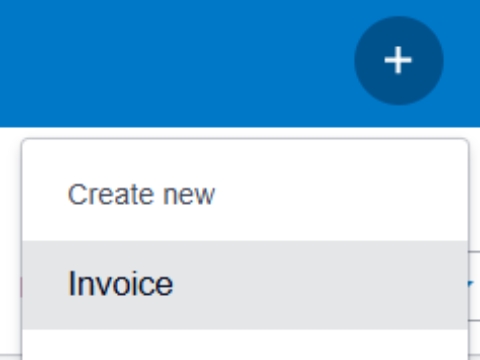
Before we start to enter invoices in Xero, we need to download the invoice from SF. E.g. 17237 Click on plus sign & click invoice

Below will appears

Separate freight charges as screenshot

Separate freight charges as screenshot

Inventory & COGS figure - Sculptform US buy from Sculptform AU & Sell to the US customer
Sculptform AU invoices need to be entered in Xero & if any other purchase is made directly in US
In this case total figure of Inventory & COGS = total figure of 17236A & B (Exclude airfreight) & PO-13702(Griffin painting Inc)
In Xero - Go to charts of account – go to account inventory to check the USD figure – screenshot figure is AU

PO-13702(Griffin painting Inc) & You can check on the Sales order line where you can find the related SO of the PO

Need to find out the related invoice from Sculptform AU

Need to find out the related invoice from Sculptform AU

Total inventory figure =32,148.33+9,476.68= USD 41,625.01 +7,480(Griffin Painting Inc)= 49,105.01
Final invoice looks like below
Click add payment if payment already received as per salesforce

Click add payment if payment already received as per salesforce

Then we need to update COGS figure in SF Follow this link - AG Invoiced_Line__c | Salesforce Update the COGS figure in this case USD 41,625.01, Griffin Painting Inc one is already link with INV-17237 in SF Click save

Tariff charges to Customer goes to
4-4400 Other income