
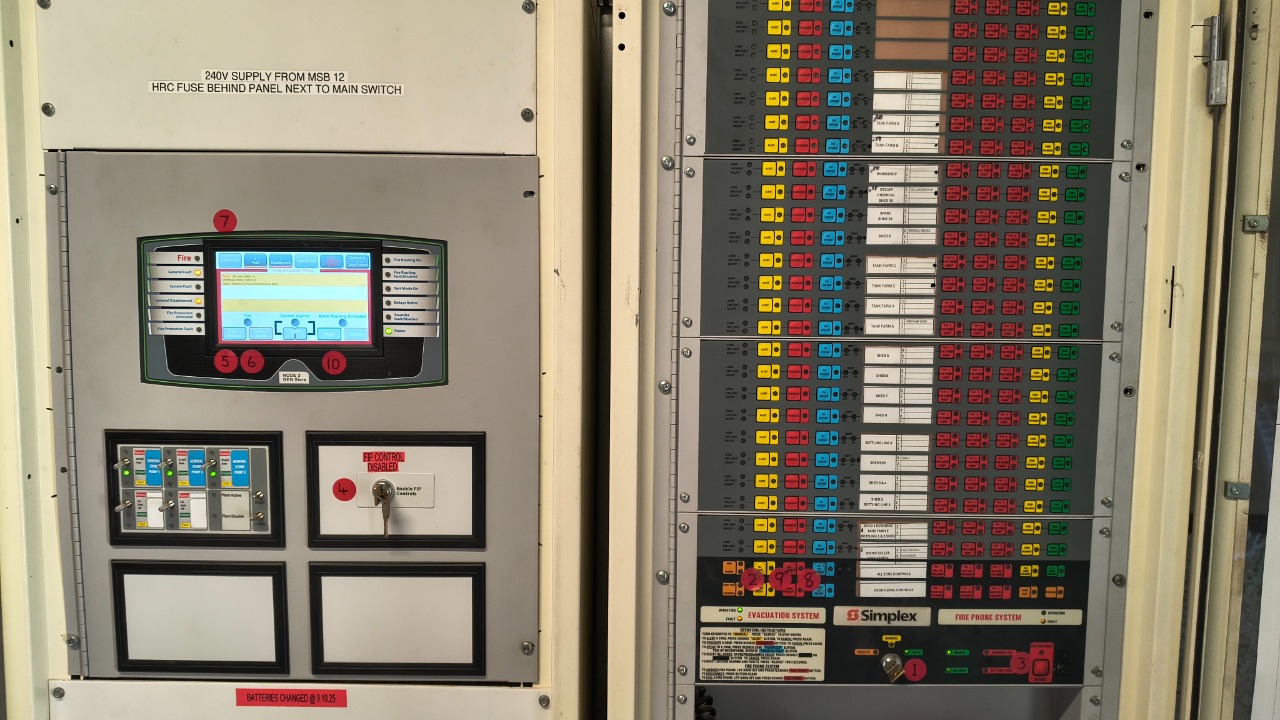

Turn Key From Auto to Manual
If control is achieved MANUAL light will be solid orange, if light remains flashing someone has taken control of a panel

Press Yellow ALL ALERT Button x 2 to stop alert tone


Turn key To enable FIP Controls
FIP = Fire Indicator Panel

Press Silence Buzzer on FIP
Press Silence Alarm on FIP

Check Zone In Fire for location
Zone Number
Address
Send wardens to check area in alarm by either verbal message, phone or WIP

Press Blue PA ALL BUTTON
Make below announcement using the handheld speaker:
"Attention all staff & visitors. The recent beeping tone has been activated by fire alarm. Location of alarm is ……………………… We are Investigating"
If False Alarm or False Situation Reported back make below announcement and go to step 11.
"Attention all staff & visitors. The recent alarm has been investigated & is a false alarm. Can wardens and staff resume their duties"
If situation confirmed as a genuine emergency, make below announcement and continue steps.
"Attention all staff & visitors. For reasons of safety could all staff & visitors follow your warden's direction & leave via the nearest safe exit & move to the assembly points located at the main car park or the vintage truck smoko area"
(Repeat this twice)

Press red ALL EVACUATE
Chief wardens must go to reception fire control panel to coordinate evacuation and complete handover to emergency services.
Emergency services must be called (000).

Once an all clear is received from Wardens press Reset to clear the FIP
NOTE: After the FIP has been reset:
Press the red silence button on the EWIS for 6 seconds.
Turn key (EWIS Panel) from MANUAL to AUTO
Turn key (FIP Panel) to disenable FIP controls