
Guide to Raising a Xurrent Ticket for New or Change Access Requests
1
Step 1 of 4Click on IT Service Desk and click on new request.
2
Step 2 of 4Click on Information Technology
SAP
Access & Technical Support: AUS
3
Step 3 of 4Click on Access Request
4
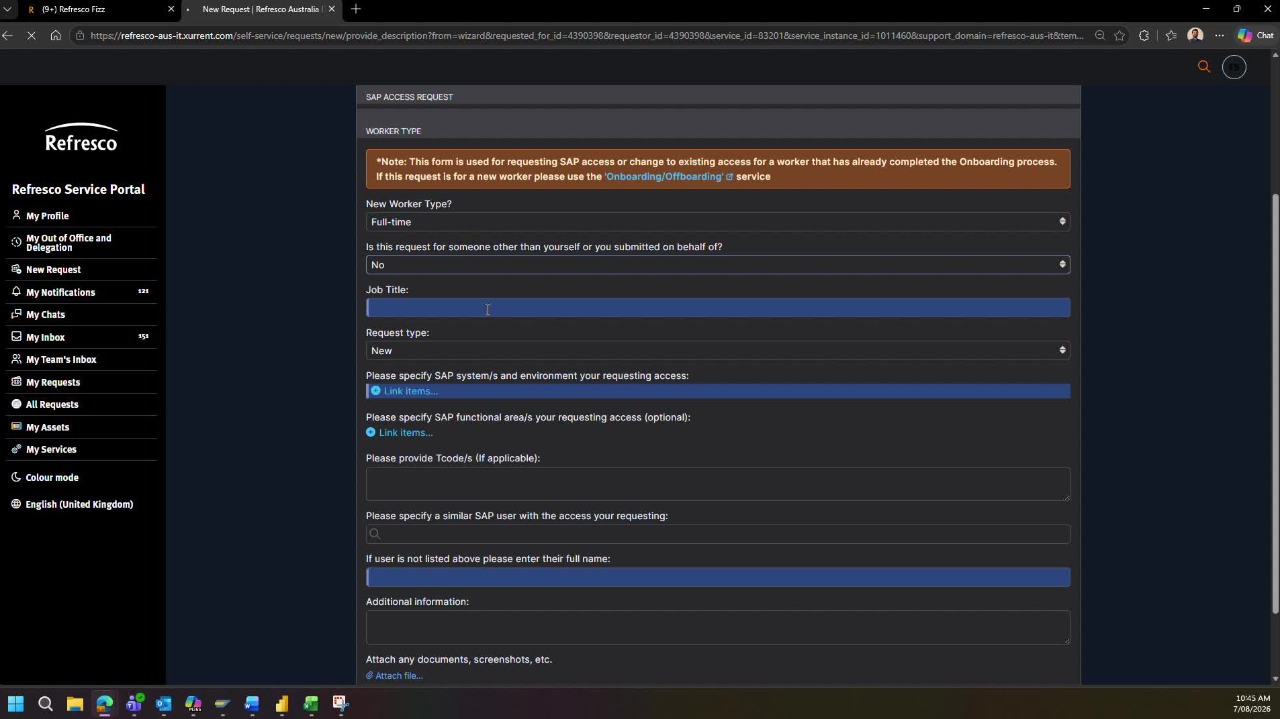
Step 4 of 4Fill out the form.
For new user request select the appropriate Worker Type.
Select Yes/No if request is for someone other than yourself.
Add Job Title
Select New for New User and Change for T-Code access request
Select which SAP environment are you requesting for
Select the Functional Area (Optional)
Mention the T-Code if requesting change in access
Mention similar user who has access.
Add additional comments