
Knowby Sculptform
Knowby
Forecasting
1
Step 1 of 3
<p><span style="color: rgb(38, 38, 38); line-height: 1.4;">The standard forecasting rules are below.</span></p><ol><li><p><span style="line-height: 1.4;">If there is an Despatch date this is the Start date</span></p></li><li><p><span style="line-height: 1.4;">No Despatch date the Start date = Close date + 60</span></p></li><li><p><span style="line-height: 1.4;">Finish date for &lt;$200k = Start date + 15</span></p></li><li><p><span style="line-height: 1.4;">Finish date for $200 – $500k = Start date + 60</span></p></li><li><p><span style="line-height: 1.4;">Finish date for &gt;$500k = Start date + 90</span></p></li></ol><p></p>

The standard forecasting rules are below.

  1. If there is an Despatch date this is the Start date

  2. No Despatch date the Start date = Close date + 60

  3. Finish date for <$200k = Start date + 15

  4. Finish date for $200 – $500k = Start date + 60

  5. Finish date for >$500k = Start date + 90

2
Step 2 of 3
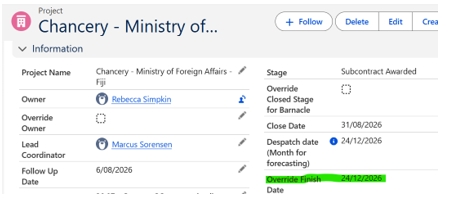
<p>If you want to adjust the Finish date, you can override it on the project card in Salesforce.</p>

If you want to adjust the Finish date, you can override it on the project card in Salesforce.

3
Step 3 of 3
<p><span style="color: rgb(38, 38, 38); line-height: 1.4;">The Green ones are the calculation as per standard rules, the Yellow is what you can edit to override the standard dates.</span></p>

The Green ones are the calculation as per standard rules, the Yellow is what you can edit to override the standard dates.