
Knowby Sculptform
Knowby
Payroll Journal Fortnightly - MYOB(AU) Process
After processing the Payroll Payment proceed for Payroll Journal Payroll Journal- Fortnightly- Process • • Click Use recurring Select Payroll Journal- Fortnightly
1
Step 1 of 15
<ul><li><p>After processing the Payroll Payment from bank feed </p></li><li><p>Process Payroll Journal</p></li></ul><p></p>
  • After processing the Payroll Payment from bank feed

  • Process Payroll Journal

2
Step 2 of 15
<p>Payroll Journal- Fortnightly- Process</p><p></p><p></p>

Payroll Journal- Fortnightly- Process

3
Step 3 of 15
<ul><li><p>Click Use recurring Select</p></li><li><p>Payroll Journal- Fortnightly</p></li></ul><p></p>
  • Click Use recurring Select

  • Payroll Journal- Fortnightly

4
Step 4 of 15
<p>Change date– Payroll date as per excel sheet</p><p>• • •</p><p>Change Memo - as per excel sheet </p><p></p><p>Update figure – As per excel sheet If all matches click Record.</p><p></p>

Change date– Payroll date as per excel sheet

• • •

Change Memo - as per excel sheet

Update figure – As per excel sheet If all matches click Record.

5
Step 5 of 15
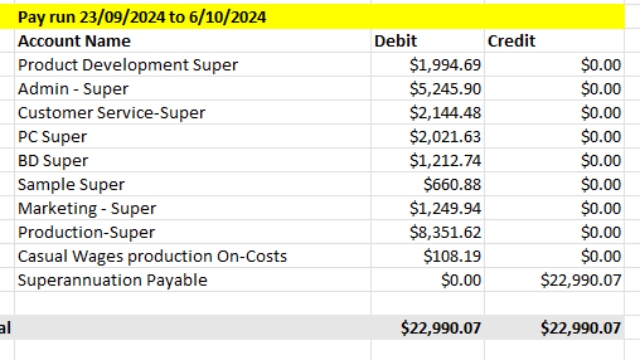
<p>Same process - Super Payable -Fortnightly</p>

Same process - Super Payable -Fortnightly
6
Step 6 of 15
<p>Same process - Super Payable -Fortnightly</p>

Same process - Super Payable -Fortnightly

7
Step 7 of 15
<p>Same Process - AL & LSL -Fortnightly</p>

Same Process - AL & LSL -Fortnightly

8
Step 8 of 15
<p>Same Process - AL &amp; LSL -Fortnightly</p>

Same Process - AL & LSL -Fortnightly

9
Step 9 of 15
<p>Same Process - AL &amp; LSL -Fortnightly</p>

Same Process - AL & LSL -Fortnightly

10
Step 10 of 15
<p>For reconcilition </p><p>Go to Payroll </p><p></p><p>Mark all Clear transactions Click reconcile</p>

For reconcilition

Go to Payroll

Mark all Clear transactions Click reconcile

11
Step 11 of 15
<p>Note - Same process for other balance sheet account to do a reconciliation</p><p></p><h1><strong>Loan to Employees</strong></h1><p></p><p>Interest loan Journal Entry Use Recurring In search type interest Select Interest – </p>

Note - Same process for other balance sheet account to do a reconciliation

Loan to Employees

Interest loan Journal Entry Use Recurring In search type interest Select Interest –

12
Step 12 of 15
<p>Use the current interest rate date</p><p>Always change date as per excel date (example 7/11/2024 to 6/11/2024)</p>

Use the current interest rate date

Always change date as per excel date (example 7/11/2024 to 6/11/2024)

13
Step 13 of 15
<p>After clicking the record always match the excel figure on loan account in account list MYOB</p>

After clicking the record always match the excel figure on loan account in account list MYOB
14
Step 14 of 15
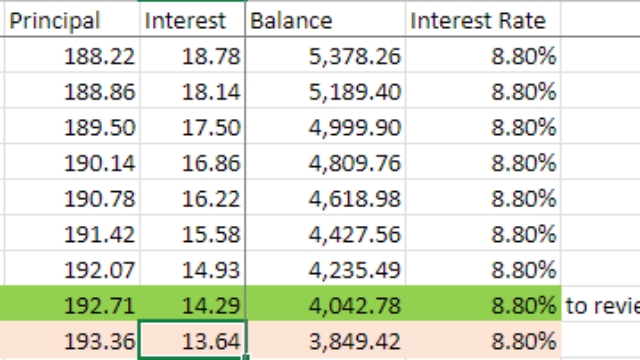
<p>Use the current interest rate date</p><p>Always change date as per excel date (example 7/11/2024 to 6/11/2024)</p><p>Put the figure amount in the Journal of interest 13.64 then click record.</p>

Use the current interest rate date

Always change date as per excel date (example 7/11/2024 to 6/11/2024)

Put the figure amount in the Journal of interest 13.64 then click record.

15
Step 15 of 15
<p>After clicking the record always match the excel figure on loan account in account list MYOB</p><p>Sample:
Excel
MYOB</p><p>3,849.42
3,849.42</p>

After clicking the record always match the excel figure on loan account in account list MYOB

Sample: Excel MYOB

3,849.42 3,849.42