Knowby Sculptform
Knowby
Checking/Monitoring CreditorWatch Alert
CreditorWatch alerts are typically used to monitor changes in the credit risk profile of your customers, suppliers, or other entities.
1
Step 1 of 7
<p></p><p>Log in to CreditorWatch Portal</p><p><a target="_blank" rel="noopener noreferrer nofollow" href="https://login.creditorwatch.com.au/">Login | CreditorWatch</a></p><p></p><ul><li><p>Go to CreditorWatch and sign in with your credentials.</p></li></ul><p><a target="_blank" rel="noopener noreferrer nofollow" href="mailto:AccountsAR@sculptform.com">AccountsAR@sculptform.com</a></p><p>&nbsp; PW: project@2</p><p></p><p></p>

Log in to CreditorWatch Portal

Login | CreditorWatch

  • Go to CreditorWatch and sign in with your credentials.

AccountsAR@sculptform.com

  PW: project@2

2
Step 2 of 7
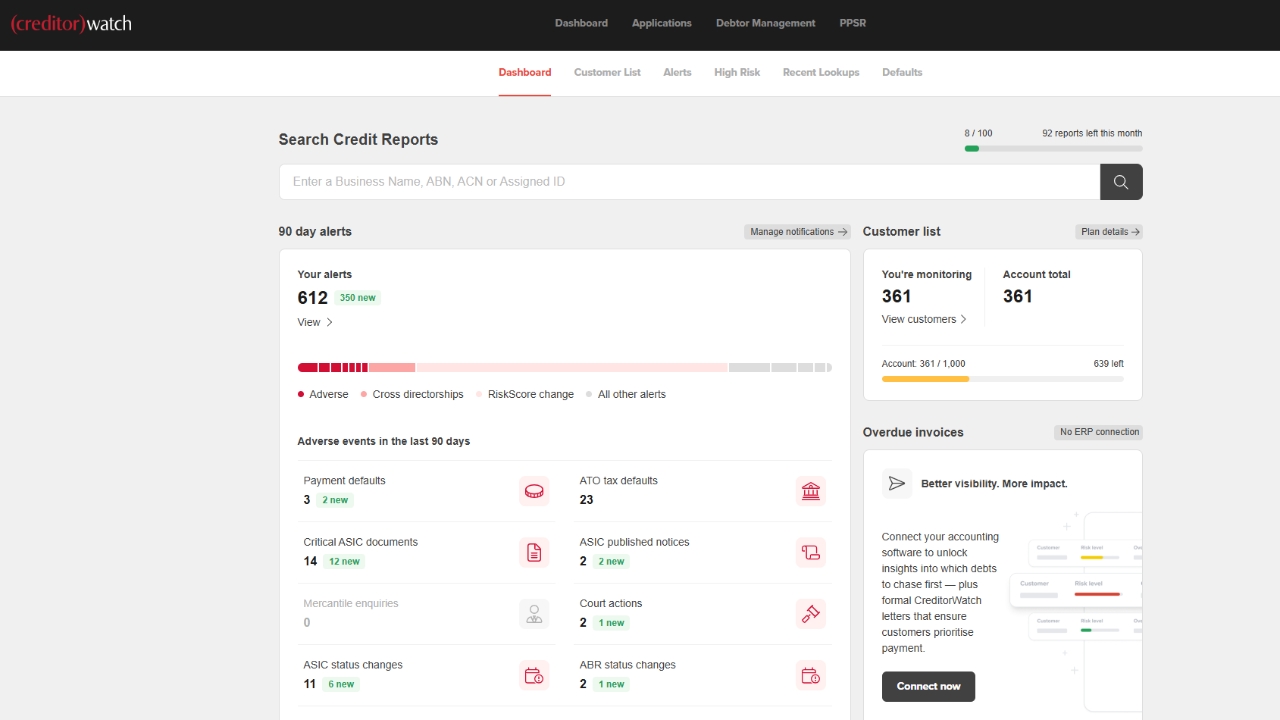
<p>For a specific company to check, </p><p></p><p>Go to the CW Dashboard and enter the ABN (Australian Business Number) in the search bar to ensure the accuracy of the company being searched.</p>

For a specific company to check,

Go to the CW Dashboard and enter the ABN (Australian Business Number) in the search bar to ensure the accuracy of the company being searched.

3
Step 3 of 7
<p>CreditorWatch also sends email notifications and alerts about company status updates, such as ASIC changes, ATO tax defaults, and risk score adjustments.</p><p></p><p>Through these emails, you can easily review updates for each company. If there are many alerts, you can open the attached Excel file to browse the full report and monitor all companies with major credit score changes.</p>

CreditorWatch also sends email notifications and alerts about company status updates, such as ASIC changes, ATO tax defaults, and risk score adjustments.

Through these emails, you can easily review updates for each company. If there are many alerts, you can open the attached Excel file to browse the full report and monitor all companies with major credit score changes.

4
Step 4 of 7
<h3><strong>Review Company Details</strong></h3><p>Verify the following information:</p><ul><li><p><strong>Credit Score &amp; Risk Rating</strong></p><ul><li><p>If the risk score has decreased, investigate the possible reasons. Common causes include:</p><ul><li><p><strong>ATO Tax Defaults</strong></p></li><li><p><strong>Payment Defaults</strong></p></li><li><p><strong>Court Actions</strong></p></li><li><p><strong>ASIC Changes</strong></p></li><li><p><strong>Cross-Directorship Issues</strong></p></li></ul></li></ul></li></ul><p></p>

Review Company Details

Verify the following information:

  • Credit Score & Risk Rating

    • If the risk score has decreased, investigate the possible reasons. Common causes include:

      • ATO Tax Defaults

      • Payment Defaults

      • Court Actions

      • ASIC Changes

      • Cross-Directorship Issues

5
Step 5 of 7
<h3><strong>Notify Relevant Teams</strong></h3><p>After investigating the reason for the credit score change, notify the Sales team, Logistics, and Management.</p><p></p><p>Pay special attention to DEBTORS, particularly those with active communication with the Sales team, ongoing projects, and outstanding invoice/s.</p>

Notify Relevant Teams

After investigating the reason for the credit score change, notify the Sales team, Logistics, and Management.

Pay special attention to DEBTORS, particularly those with active communication with the Sales team, ongoing projects, and outstanding invoice/s.

6
Step 6 of 7
<h3><strong>Update Internal Records and Apply Risk Controls</strong></h3><p>In the event of any significant negative updates from CreditorWatch, ensure you add a note in the <strong>Accounts Notes</strong> section of the company card in Salesforce.</p><p></p><p>For debtors whose risk score rating has dropped to <strong>D1 or below</strong>, and especially if they have an <strong>ATO Tax Default</strong>, change their payment terms to <strong>Pre-paid before dispatch</strong>. <strong>Continue frequent monitoring</strong> and provide regular updates to the team until the risk score improves.</p><p></p><p>Always include notes reflecting <strong>Management advice</strong> for proper guidance, as some issues may require further discussion and decision-making.</p>

Update Internal Records and Apply Risk Controls

In the event of any significant negative updates from CreditorWatch, ensure you add a note in the Accounts Notes section of the company card in Salesforce.

For debtors whose risk score rating has dropped to D1 or below, and especially if they have an ATO Tax Default, change their payment terms to Pre-paid before dispatch. Continue frequent monitoring and provide regular updates to the team until the risk score improves.

Always include notes reflecting Management advice for proper guidance, as some issues may require further discussion and decision-making.

7
Step 7 of 7