
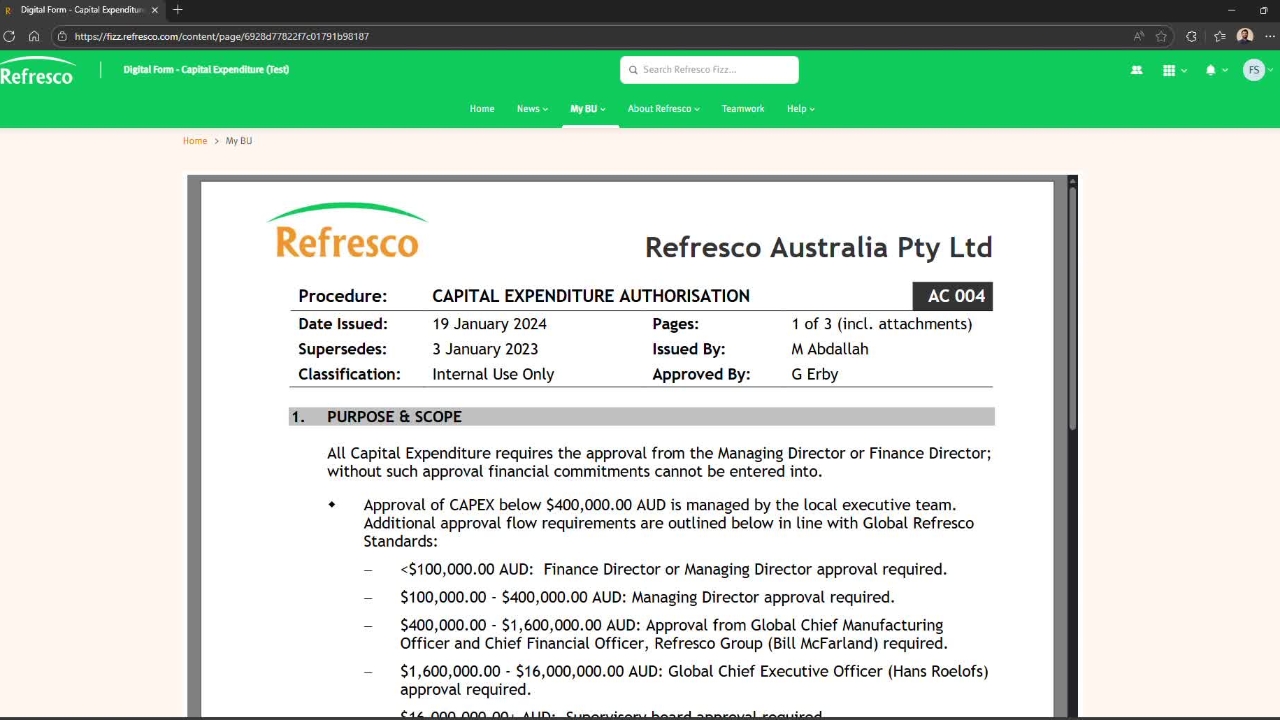
Navigate to fizz.refresco.com, Under My BU > Digital Forms > Digital Form - Capital Expenditure.
Read the procedure before filling out a form and click continue.
Begin by entering the date. Next, indicate whether the request is being submitted on behalf of someone else or if you are the requestor. Then, select the location and department for which the CAPEX is being raised.
Enter the supplier details, the quotation number (if available), a description of the item or service, Currency and the total amount.
Your workflow is automatically adjusted based on the Delegation of Authority. Each manager has a defined approval threshold, and requests are routed accordingly.
Attach any supporting documents. Please note that only PDF files are accepted. Add any additional comments as needed, and then submit the form.

After submitting the form, you will receive a notification confirming that your Capital Expense request has been successfully submitted. Once your manager approves the request, it will be forwarded to the Finance team for a duplication check.
If any duplicate entries are identified, you will receive an email notification advising you of the issue. If no duplicates are found, the request will continue through the remaining steps of the workflow.
After all required approvals have been completed, the request will be sent to the Finance team for final processing.