
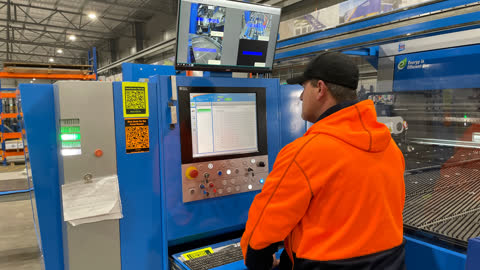
Select the archive button on the left-hand side of the screen
Select the drop-down arrow on the right hand side of the screen to bring up programs

Select the required program
Select the program and add to task list
Select the empty cycle button, then select the play button at the top left hand corner pop-up will come up that says start cycle. Press the start cycle button
Once machine has finished, it’s reload cycle, select the reset button and then the manual button to put the machine into manual
Select the manual button at the top Santa screen, then go to the job manual are on the top taskbar Dan select the LDH to get ready to move it
Check that there is nothing obstructing the LDH press the job plus button to move the LDH away from the pallet load position
Head to the palate loading position press door opening request when the safety restore blue light is on it is safe to open the doors and enter the pallet area
Unlock the palate bed and move the pallet away from the side magnets. It is now safe to remove this pallet
Now shut the gate and reset the safety circuit by pressing door opening request off and safety re-store
Return to the main console, press the safety restore button, then press the hydraulic unit button. Wait for the hydraulic unit button to come solid.
Press the reset button push the machine, automatic start button and then press the step-by-step button should be off
Select the play button at the top left hand corner of the screen, then press the start button down on the console. A pop-up will appear and arcs if the table is clear then press the start button and then the table magnet or auto adjust to the correct size.
A message will appear asking to place panels on the loading table. Push reset then manual.
Press the MANUAL button at top centre of screen then press JOG then press LDH.
Check nothing is obstructing the LDH from moving then press JOG + to move the LDH away from pallet loading area.
Open the gates by pushing DOOR OPENING REQUEST.
Place panels on loading table. Then unlock handle to move panels to the magnets. Ensure that panels are touching back and side magnets. lock the table with handle.
Close the gates then push DOOR OPENING REQUEST AND SAFETY RESTORE.
Go to control panel Press SAFETY RESTORE then HYDRAULIC UNIT wait until hydraulic unit button stops flashing. Press RESET.
Then turn step by step button off Empty cycle button off on console. Press automatic button on console.
Program is now ready to start Press play icon top left of screen. Then press start on console. Program will now run.