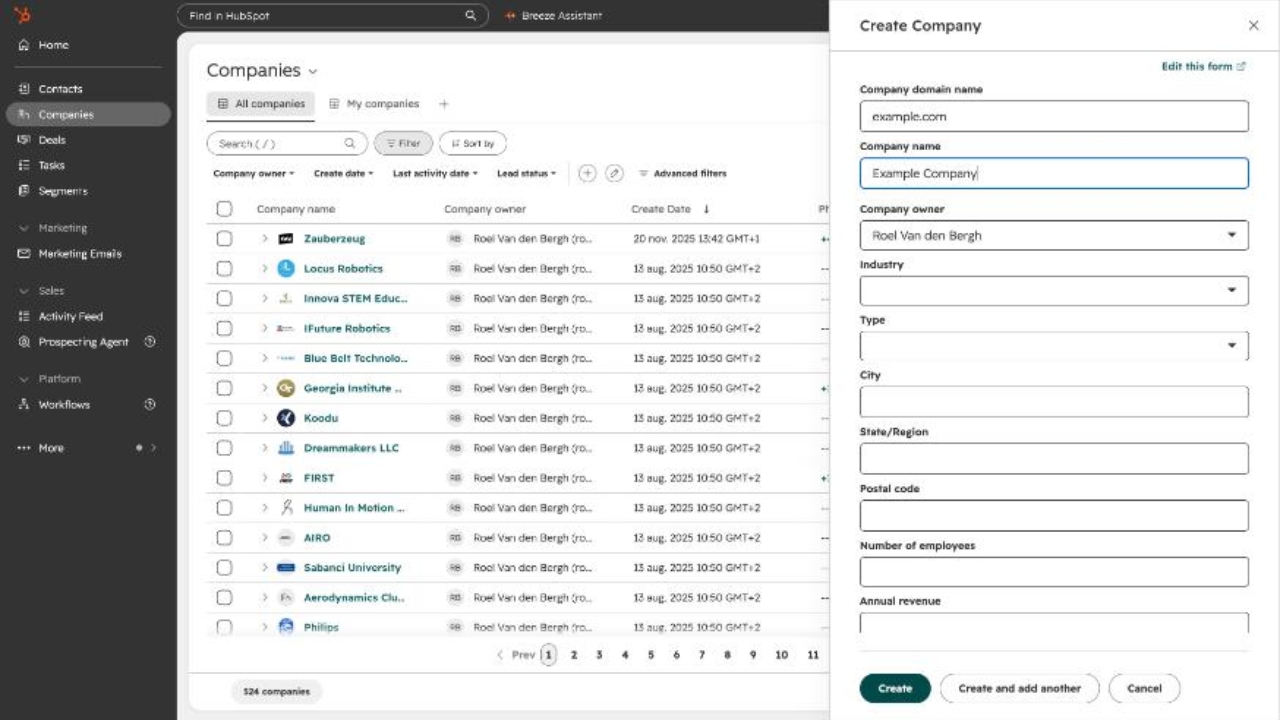

Log in to HubSpot and click Companies in the left-hand navigation menu.

On the Companies overview, click the green Add companies button in the top-right corner.

Select Create new from the dropdown menu. (Use Import instead to upload several companies from a file.)

In the Create Company panel, enter the Company domain name first (e.g. example.com). HubSpot uses the domain to prevent duplicates and to auto-fill known company details.

Enter the Company name, check that the Company owner is correct (it defaults to you), and fill in Industry, Type, City, Postal code, Number of employees and Annual revenue where known.

Click Create to save the company. Use Create and add another if you have more companies to add. The new company now appears in the Companies list.