
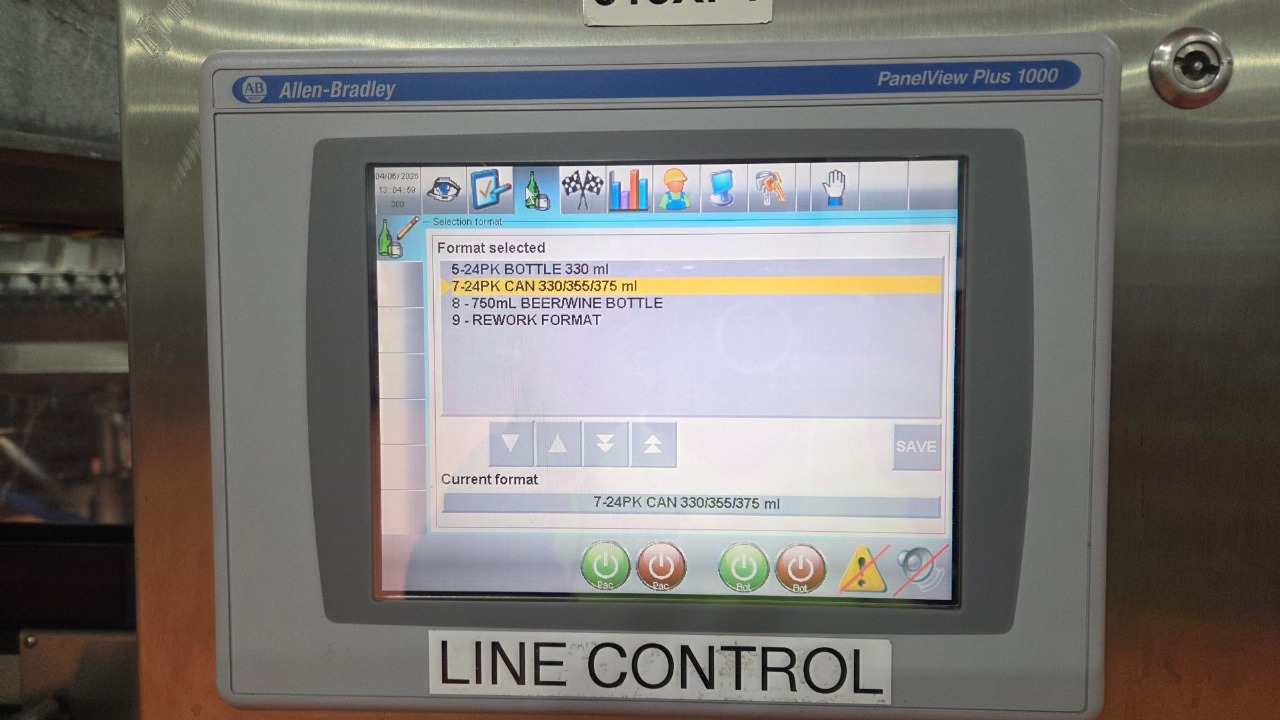

There are 4 Main line control panels for Cans
The main control panel pre line 6 filler
2.Singuliser Controller before Blower
3. Singuliser Controller box before evotech
4.Singuliser Controller box after the carton coder
Note: If doing bottles refer to :
Line Control - Dry Side BOTTLES

Go to Main Control panel this is located pre- filler (Controller 1)
1.Press Bottle
2.Move arrow 'up or down' to correct format
3.Press '24pk Can 330/355/375 ml'
4.Press 'Green tick'
5.Press 'Pac' & 'Bot' to start conveyor
Current format will be displayed on the Bottom line
When changing formats the conveyors must be stopped
6.Reset alarms by pressing the 'eye' and press 'reset' button

Singuliser Controller before Blower this controls from the filler to the labeller (Controller 2)
Press 'green' button
To remain off for cans unless emptying the line

Singuliser controller box before the Evo tech which control's cans into the packers (Controller 3)
1.Press Green 'Start' Button

Singuliser controller box after the carton coder controlling cans to the palletiser (Controller 5)
Press Green 'Start' Button
Watch for turned cartons

There are also other singuliser controllers' boxes located around the area
Next to the lab equipment
2.Prior to the labeller
3.Prior to the filler
These can be used to used stop, start or empty machine

When emptying out the line
Depal will have finished
Cans will have stopped adjacent to the lab equipment
1.Press 'Red' Stop button
On control panel Press 'Emptying' button (Controller 2)
When emptying out be wary of fallen cans
Note: Cans will stop at evo tech singuliser
3.Go to singuliser controller box before the evotech and press 'empty' button

When the line is Finished go to main control panel (controller 1) to turn off
1.Press Red 'Pac' & 'Bot'
It will not be green anymore, which will mean its stopped