Knowby Sculptform
Knowby
Checking Accounts AP/AR Emails - Every Morning
Checking Accounts AP/AR emails Every morning, we must check AP/AR email after doing the bank feed. Accounts AP email We have created a categories Mei Stock invoices – Categories to Mei MYOB invoice/Operating expense – Sabi/Anthony • •
1
Step 1 of 7
<p>Checking Accounts AP/AR emails Every morning, we must check AP/AR email after doing the bank feed. Accounts AP email</p><p>• •</p><p>Categories US and UK - Sabi</p><p></p><p>Categories Stock invoices and NZ – Mei </p><p></p><p>MYOB invoice/Operating exp. – Anthony</p>

Checking Accounts AP/AR emails Every morning, we must check AP/AR email after doing the bank feed. Accounts AP email

• •

Categories US and UK - Sabi

Categories Stock invoices and NZ – Mei

MYOB invoice/Operating exp. – Anthony

2
Step 2 of 7
<p>• •</p><p>We have created a Categories as per in charged.</p>

• •

We have created a Categories as per in charged.
3
Step 3 of 7
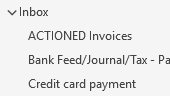
<p>After entering the invoices</p><p>drag the email to Action invoices folder.</p><p></p><p></p><p>Credit card payment receipt drag to Credit card payment folder.</p><p></p><p></p>

After entering the invoices

drag the email to Action invoices folder.

Credit card payment receipt drag to Credit card payment folder.
4
Step 4 of 7
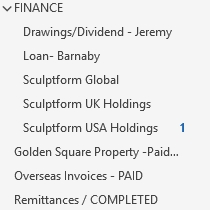
<p>Any finance info and expense:</p><p></p><p>&nbsp;Finance folder Jeremy personal expense – Drawing /Dividend – Jeremy folder</p><p></p><p>Loan related to Barnaby - Loan to Barnaby</p><p></p><p>Global Expense - Sculptform Global</p><p></p><p>Sculptform UK - Sculptform UK Holdings</p><p>Sculptform USA - Sculptform USA Holdings</p><p></p><p>Golden Square Property Exp to Golden Square Property - Paid</p><p></p><p>Overseas invoices paid /info – Overseas invoices folder Supplier Credit</p><p></p>

Any finance info and expense:

 Finance folder Jeremy personal expense – Drawing /Dividend – Jeremy folder

Loan related to Barnaby - Loan to Barnaby

Global Expense - Sculptform Global

Sculptform UK - Sculptform UK Holdings

Sculptform USA - Sculptform USA Holdings

Golden Square Property Exp to Golden Square Property - Paid

Overseas invoices paid /info – Overseas invoices folder Supplier Credit
5
Step 5 of 7
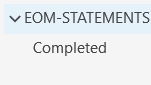
<p>All Statement from supplier should be drag to EOM-Statement.</p>

All Statement from supplier should be drag to EOM-Statement.
6
Step 6 of 7
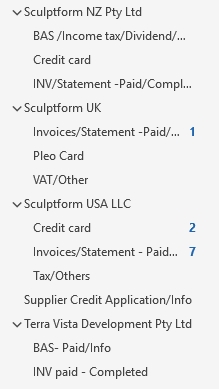
<p>Drag the email invoices to their designated folder:</p><p></p><ul><li><p>Sculptform NZ</p></li><li><p>Sculptform UK</p></li><li><p>Sculptform USA LLC</p></li><li><p>Terra Vista Development</p></li></ul><p></p><p></p><p></p>

Drag the email invoices to their designated folder:

  • Sculptform NZ

  • Sculptform UK

  • Sculptform USA LLC

  • Terra Vista Development

7
Step 7 of 7
<p>Accounts AR email</p><p>Check the email every morning or when we received and action according or if you don’t have to do anything then drag the email on different folder</p><p>• • • • • •</p><p>Invoices put on invoices-SO folder Direct deposit email on Direct deposit - bank feed folder When payment received the remittance advice/receipt go to Remittance/completed folder Other completed and actions email drag on Remittance/completed folder When you done any report/AR info email put on Report/information folder After processing credit application /PPSR email put on Customer credit application/PPSR folder Reminder email/follow up email to debtor put on Debtor Folder when we received the payment then put on Remittance/completed folder</p>

Accounts AR email

Check the email every morning or when we received and action according or if you don’t have to do anything then drag the email on different folder

• • • • • •

Invoices put on invoices-SO folder Direct deposit email on Direct deposit - bank feed folder When payment received the remittance advice/receipt go to Remittance/completed folder Other completed and actions email drag on Remittance/completed folder When you done any report/AR info email put on Report/information folder After processing credit application /PPSR email put on Customer credit application/PPSR folder Reminder email/follow up email to debtor put on Debtor Folder when we received the payment then put on Remittance/completed folder