
Update a published knowby
Changed something in a published knowby? Your edits go live only after you publish the knowby again through the approval process.
Changed something in a published knowby? Your edits go live only after you publish the knowby again through the approval process.
1
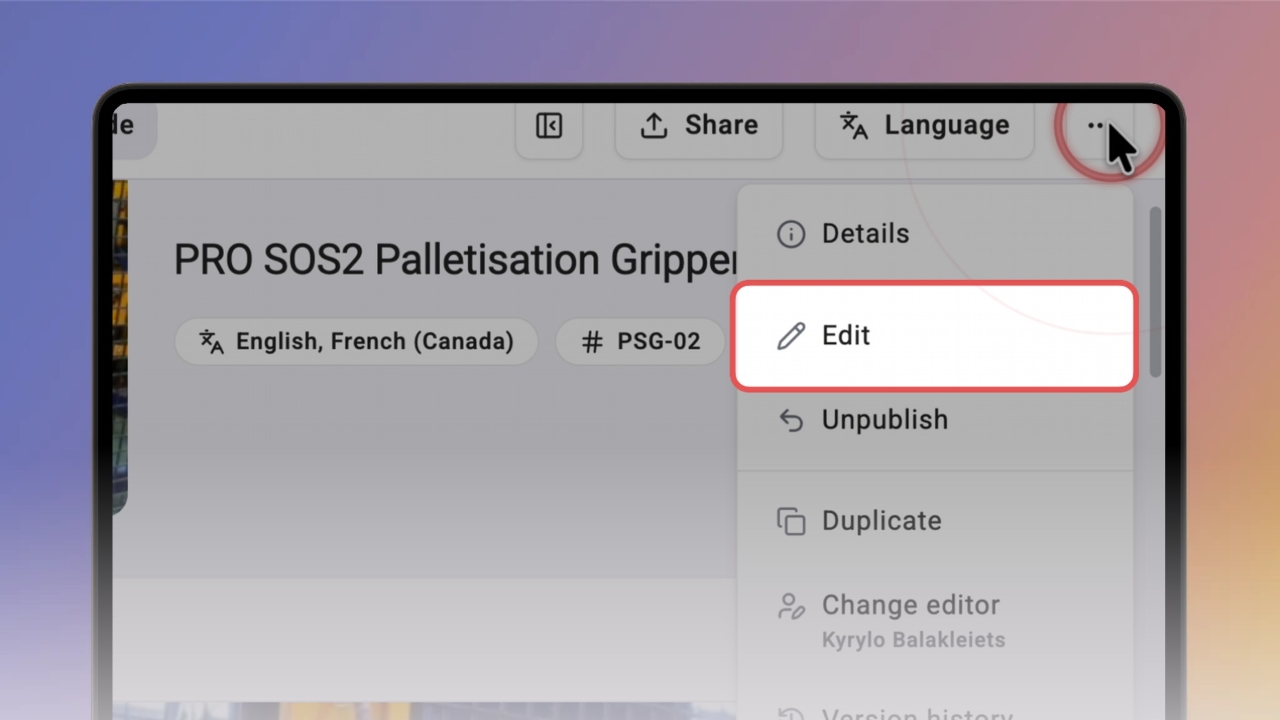
Step 1 of 6Open the knowby, click ⋯ in the top right corner and select Edit.
2
Step 2 of 6Make your changes in Knowby Studio, then click Done. Your changes are saved, but they're not live yet.
3
Step 3 of 6Click Publish. The Approval process opens — choose categories and access as usual, then click Next.
4
Step 4 of 6Add a short comment about what changed and click Next.
Tip: The comment is shown in the Change Log, so your team can see what was updated.
5
Step 5 of 6Choose who approves the update. Admins can publish straight away. Members must select an approver — the update goes live once it's approved.
6
Step 6 of 6Your knowby is processed — you'll see Your knowby is ready when it's done. Open Knowbys to see the updated version.