Knowby
Tyre Doctor
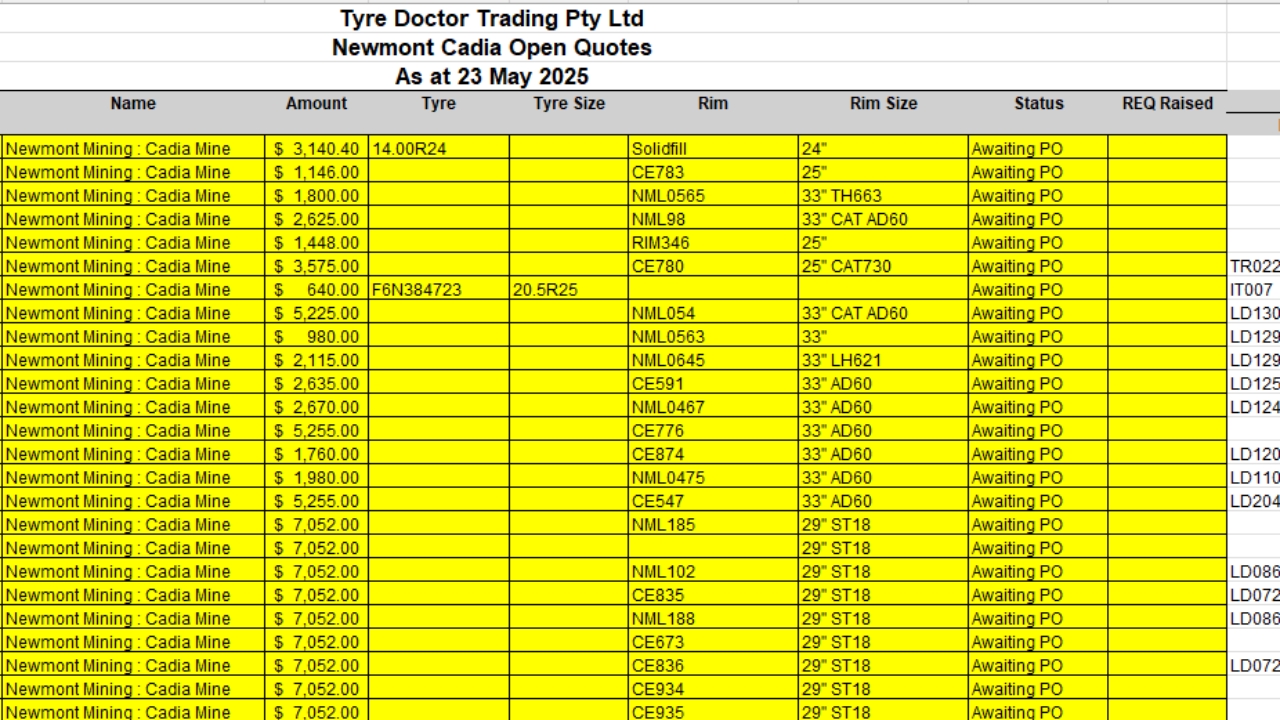
Cadia Outstanding - WIP List
Updating outstanding list for Quotes requiring PO's - Cadia
Updating outstanding list for Quotes requiring PO's - Cadia
1
Step 1 of 12How to find the List🔎 - Step 1
- Head to Tyre Doctor Files - Onedrive
> Sales - Documents >
> b. Customer Folders >
> Newcrest Cadia - Sharing Permission on >
> Excel File 'Quotes awaiting Purchase Order'
2
Step 2 of 12How to find the List🔎 - Step 2
- Open both programs side-by-side
i.e. Excel & Netsuite.
3
Step 3 of 12Updating the List📝 - Step 1
- Copy and Paste Quote from Excel into Netsuite.
- Head to 'Related Records' and Open 'Sales Order'.
- Check for a PO# in the PO Column.
- If there is no PO, it remains in the list.
4
Step 4 of 12Updating the List📝 - Step 2
Copy and Paste Quote from Excel into Netsuite.
Head to 'Related Records' and Open 'Sales Order'.
Check for a PO# in the PO Column.
If there is a PO, remove it from the Excel Sheet.
5
Step 5 of 12Updating the List📝 - Step 3
- Clear out the entire list to "Only Quotes without PO's"...
6
Step 6 of 12Updating the List📝 - Step 4
- You will recieve an Email from Site with updated REQ's and PO's.
- Remove any further lines that have PO's.
7
Step 7 of 12Updating the List📝 - Step 5
- Copy any REQ's across, that do not already have PO's.
- Make sure they match the exact Quotes.
8
Step 8 of 12Updating the List📝 - Step 6
- The Lines that have REQ's, colour their Cells into Green.
9
Step 9 of 12Updating the List📝 - Step 7
- Head to "Open Sales Orders".
- Open all Sales Orders - "Pending Approval"
P.S. - Follow the below link to find "Open Sales Orders"
10
Step 10 of 12Updating the List📝 - Step 8
- Head to the Sales Order's.
- Go to the Quote Form for all Details.
P.S. Make sure you don't double up Sales Order's already in the List!
11
Step 11 of 12Updating the List📝 - Step 9
Start adding in all the details;
- Date (When Quote was created)
- Quote #.
- Name (Customer)
- Amount (Ex GST $)
- Tyre (Serial Number)
- Tyre Size
- Status (Awaiting PO)
- Machine (Found in TAG/OSR)
- CVO N.1 (Found in WO/REQ)
If details are missing, skip their column.
12
Step 12 of 12Finalise & Send to Site📩
- Email Site Contacts a Copy.
WIP List is complete!