
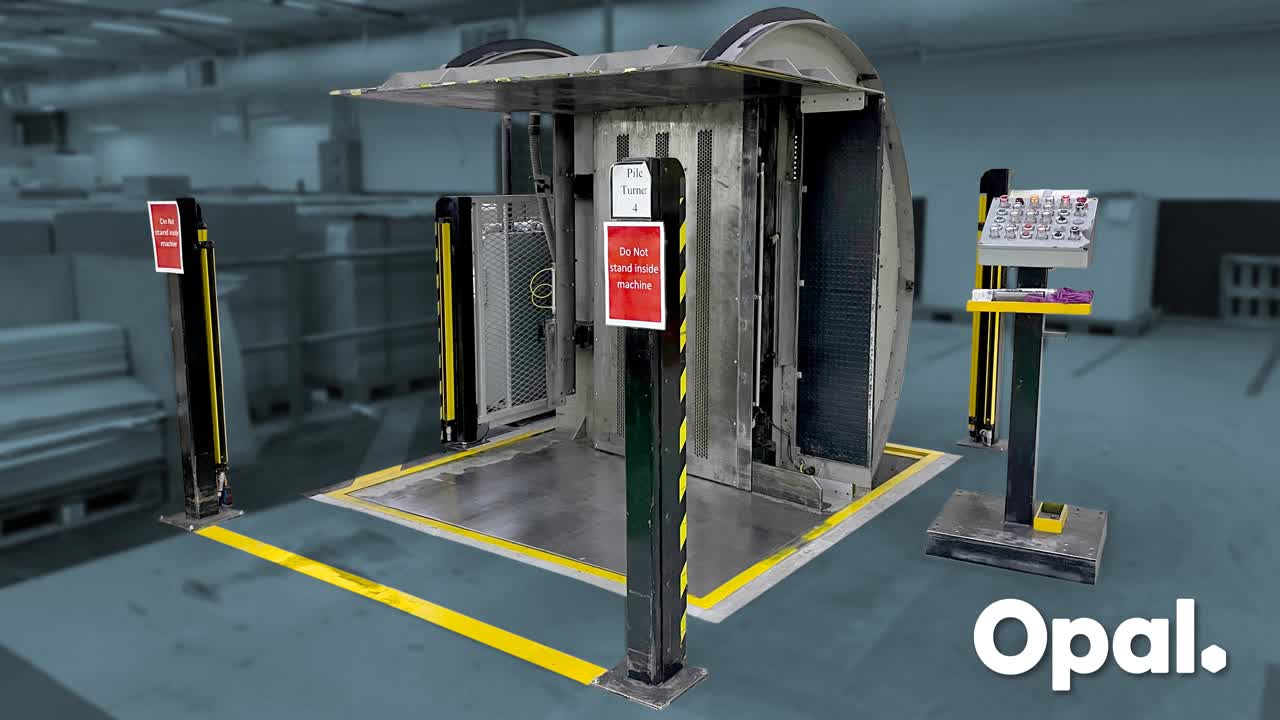
Place sheet stack into carousel as close to the pallet slide as possible. Remove the walkie stacker until it is entirely outside the area protected by the light curtains.
Press Green button to switch on the 'Pallet Slide' then press the two red 'Motion Reset' buttons twice. This will enable the carousel to tilt.
Press the 'Clamp Load' button leaving approximately 75mm space between the clamping plate and the top of the sheet stack. Press 'Right Jog' button to tilt the carousel to an approximately horizontal position.
Press 'Vibrators On' and 'Vent 2 On' then press the 'Air Belt Left' button. This function will use air to separate sheets starting from the top and working through to the bottom (pallet end) of the sheet stack.
Use the 'Clamp Load/Unclamp Load' and 'Left Jog/Right Jog' buttons to adjust sheet spacing and carousel angle to facilitate smooth airflow through the sheet stack.
Press 'Vent 2 Off' and 'Vibrators Off' buttons then remove dirty or damaged sheets from the sheet stack. If a wooden pallet has been used it must also be removed. Ensure the sheet stack is centered on the pallet before proceeding further.
Again, press the two 'Motion Reset' buttons twice then press the 'Clamp/Unclamp Load' buttons to leave approximately 75mm space between the clamping plate and the top of the sheet stack
Press 'Vibrators On' and 'Vent 2 On' then press the 'Air Belt Right' button. This function will use air to separate sheets starting from the bottom (pallet end) and work through to the top of the sheet stack.
Press the 'Jog Left' button to slightly tilt the carousel while the air travels up the sheet stack.
Press the 'Left Jog' button to return the carousel to the upright position.
When carousel has completely returned to the upright position, switch off pallet slide using green button. Visually inspect pallet stack to determine stability. If okay, remove pallet from the Pile Turner using an appropriate mechanical aid.