Knowby Sculptform
Knowby
Entering International Purchase Order in MYOB
Enter International Purchase Order & invoice in MYOB Process (SFM AU)
1
Step 1 of 10
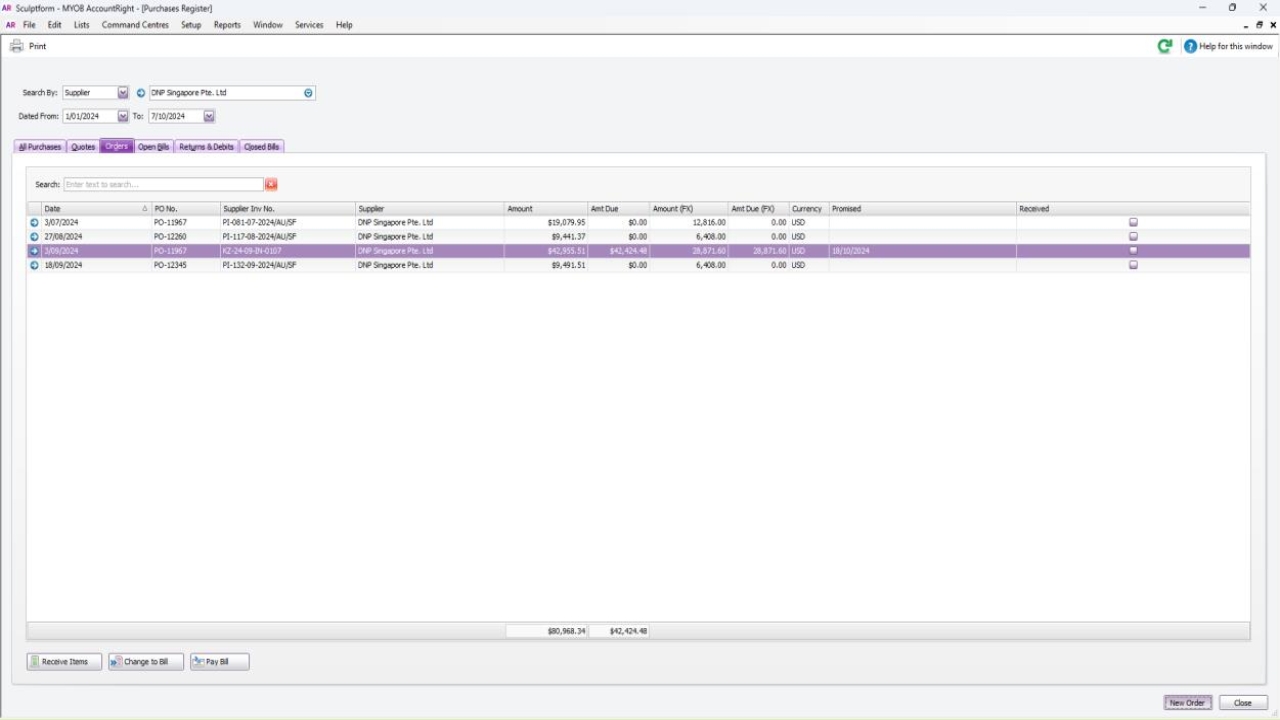
<p>To create the Salesforce International Purchase Order/Stock Order in MYOB - Like other stock Po international Po will not lick to MYOB we have to create it manually </p><p></p><p>Go to Purchase Register</p><p>Choose the customer</p><p></p><p><strong>Note on International PO</strong></p><ol><li><p>Create the International Salesforce Purchase Order - Procurement Officer</p></li><li><p>Create the International Salesforce Purchase Order in MYOB – AP/AR officer</p></li><li><p>Some International orders can just be a MYOB Purchase Order so will be entered in MYOB directly –Procurement Officer</p></li><li><p>Send to Finance TL for payment - AP/AR officer</p></li><li><p>Payment can be 50% or 30% deposit, balance payment or payment in full) – Send email to Sabi to process the international payment.</p></li><li><p>Bank Feeds – apply payment to the order Sabi/Anthony *Exchange Rate USD or EUR</p></li><li><p>When goods have arrived, the warehouse will provide documentation, then Todd will Receive in the PO in Salesforce</p></li><li><p>Convert that order to a Bill/Invoice in MYOB when the goods are received in – Mei/Sabi</p></li></ol><p></p>

To create the Salesforce International Purchase Order/Stock Order in MYOB - Like other stock Po international Po will not lick to MYOB we have to create it manually

Go to Purchase Register

Choose the customer

Note on International PO

  1. Create the International Salesforce Purchase Order - Procurement Officer

  2. Create the International Salesforce Purchase Order in MYOB – AP/AR officer

  3. Some International orders can just be a MYOB Purchase Order so will be entered in MYOB directly –Procurement Officer

  4. Send to Finance TL for payment - AP/AR officer

  5. Payment can be 50% or 30% deposit, balance payment or payment in full) – Send email to Sabi to process the international payment.

  6. Bank Feeds – apply payment to the order Sabi/Anthony *Exchange Rate USD or EUR

  7. When goods have arrived, the warehouse will provide documentation, then Todd will Receive in the PO in Salesforce

  8. Convert that order to a Bill/Invoice in MYOB when the goods are received in – Mei/Sabi

2
Step 2 of 10
<p>Click new order</p>

Click new order

3
Step 3 of 10
<p>Type customer name</p><p></p>

Type customer name

4
Step 4 of 10
<p>Click new Po’s</p>

Click new Po’s

5
Step 5 of 10
<p>Filled out the information as per SF &amp; invoice or Proforma invoice if deposit payment </p><p></p><p><strong>Notes for International Suppliers</strong></p><p></p><ol><li><p>DNP Singapore Pte Ltd – 30% deposit pay in advance - balance When goods Received, they will email you the invoice.</p></li><li><p>SN International– 50% Deposit (Above 30K order ) &amp; balance will be when goods are ready to be dispatched.</p></li><li><p>MGX Metalworks Co. Limited - 30% deposit &amp; balance will be when we received the goods</p></li><li><p>URUFOR S.A. - 100% need to pay in advance</p></li><li><p>Kamps Hardwoods - 100% need to pay in advance, wait Todd approval before making payments.</p></li><li><p>Arkidelo PTY Ltd - Put in “Order” when haven’t received in SF “Change to Bill” if received in SF On due date (must receive in SF)</p></li><li><p>Northwest Hardwoods, Inc. - 100% , wait Todd approval before making payments.</p></li><li><p>Hangzhou Guoli Packing Co., Ltd –(MYOB Invoice) Todd approval. 30% deposit Proforma Invoice and 70% against Final invoice.</p></li></ol><p></p>

Filled out the information as per SF & invoice or Proforma invoice if deposit payment

Notes for International Suppliers

  1. DNP Singapore Pte Ltd – 30% deposit pay in advance - balance When goods Received, they will email you the invoice.

  2. SN International– 50% Deposit (Above 30K order ) & balance will be when goods are ready to be dispatched.

  3. MGX Metalworks Co. Limited - 30% deposit & balance will be when we received the goods

  4. URUFOR S.A. - 100% need to pay in advance

  5. Kamps Hardwoods - 100% need to pay in advance, wait Todd approval before making payments.

  6. Arkidelo PTY Ltd - Put in “Order” when haven’t received in SF “Change to Bill” if received in SF On due date (must receive in SF)

  7. Northwest Hardwoods, Inc. - 100% , wait Todd approval before making payments.

  8. Hangzhou Guoli Packing Co., Ltd –(MYOB Invoice) Todd approval. 30% deposit Proforma Invoice and 70% against Final invoice.

6
Step 6 of 10
<p>Send email to Sabi for International payment</p>

Send email to Sabi for International payment

7
Step 7 of 10
<p>Convert that order to a Bill/Invoice in MYOB when the goods are received &amp; Todd will provide a delivery docket–</p><p></p><p>Click change to bill or Bill</p><p>Change date to today’s date</p><p>Click Record</p>

Convert that order to a Bill/Invoice in MYOB when the goods are received & Todd will provide a delivery docket–

Click change to bill or Bill

Change date to today’s date

Click Record

8
Step 8 of 10
<p>To attached invoice in MYOB </p><p>go to overseas folder &amp; find an invoice &amp; drag to MYOB in-tray.</p><p></p>

To attached invoice in MYOB

go to overseas folder & find an invoice & drag to MYOB in-tray.

9
Step 9 of 10
<p>Click on Link to existing bill</p><p>Click ok</p>

Click on Link to existing bill

Click ok

10
Step 10 of 10
<p>You can go to the invoice to check if its linked or not&nbsp;</p>

You can go to the invoice to check if its linked or not